
For Quarto and R Markdown
One line in your YAML. Checked references, every render.
Quarto reads bibliography: from a web address. Give it your RefRunner list's .bib link, and every render picks up the references you've added or corrected — each one checked against Crossref, OpenAlex and the other databases.
No account needed to try it — check our sample or upload your own paper, free and right in your browser.
A free account adds 50 lookups a day, saved reference lists, and free months when you refer colleagues.
📱 On a phone? Create a free account now and your reference lists will be waiting when start working on your paper.
How it works
Build the list
Search for papers and add them, paste a reference list, drop PDFs, or upload the .bib you have. Each reference is looked up and corrected from the publisher's record.
Copy its link
Sign in (free), save the list, and choose File → Overleaf link…. The link is an ordinary .bib file, so it serves Quarto as well as Overleaf.
Paste it into your YAML
Put the link after
bibliography:, cite with[@key], and render. Add a paper in RefRunner and it's in the next render.
What it looks like
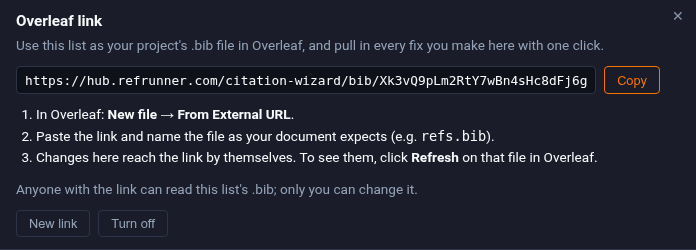
In RefRunner
File → Overleaf link…
Your saved list gets a link of its own. Copy it. Anyone with the link can read the .bib; only you can change the list.
In your .qmd
bibliography: link
The link goes where a file name would. Quarto fetches it when you render, so the bibliography is always the list as it is now.
---
title: "My paper"
bibliography: https://hub.refrunner.com/citation-wizard/bib/….bib
---

Self-regulated learners plan, monitor
and reflect [@zimmerman2002].
Questions
Does it update by itself?
Yes. Quarto downloads the .bib each time you render, so a reference you add or fix in RefRunner is in the next render. Nothing to refresh, nothing to copy.
Does it work with R Markdown?
With a current Pandoc, yes: the same bibliography: line. Pandoc 3 reads a bibliography from a URL; the Pandoc 2.9 that some Linux systems still ship does not. Quarto brings its own Pandoc.
What if I render offline?
The render needs to reach the link. To work offline, download the .bib from RefRunner (Download ▾ → BibTeX) and point bibliography: at the local file; switch back when you're online.
Can I keep my own .bib too?
Yes. bibliography: takes a list — your local refs.bib and the RefRunner link side by side. Or upload your .bib to RefRunner and have every entry checked first.
Will my citation keys change?
No. A key is fixed the first time the list is published, so correcting an author or a year later never renames it. Entries from your own .bib keep the keys you gave them.
Which citation style?
Quarto formats the references with its csl: setting, so the .bib only carries the data. RefRunner's style menu is for lists you copy or download, in any of 10,000+ styles.
Who can see the link?
Anyone who has the link can read the list's .bib; only you can change it. Make a new link and the old one stops working; turn it off and it's gone.
What does it cost?
A free RefRunner account has one saved list with its own link, and 50 reference lookups a day. Subscribers get more lists — one per paper — and more lookups.
No account needed to try it — check our sample or upload your own paper, free and right in your browser.
A free account adds 50 lookups a day, saved reference lists, and free months when you refer colleagues.
📱 On a phone? Create a free account now and your reference lists will be waiting when start working on your paper.