
For Overleaf
Your references in Overleaf. No Premium needed.
Overleaf links to Zotero and Mendeley only on its paid plans. RefRunner's Overleaf connection just works. Create a new file linked to your RefRunner reference list. References you add or edit are available to your Overleaf project with a click. Your \cites are updated on the next build.
No account needed to try it — check our sample or upload your own paper, free and right in your browser.
A free account adds 50 lookups a day, saved reference lists, and free months when you refer colleagues.
📱 On a phone? Create a free account now and your reference lists will be waiting when start working on your paper.
How it works
Build the list
Search for papers and add them, paste a reference list, drop PDFs, or upload the .bib you have. Each reference is looked up and corrected from the publisher's record.
Link it to Overleaf
Sign in (free), save the list, and choose File → Overleaf link…. In Overleaf: New file → From External URL, paste the link, and name the file
refs.bib.Add a paper, click Refresh
Add or fix references in RefRunner; the list saves itself. In Overleaf, click Refresh on
refs.biband recompile.
What it looks like
In RefRunner
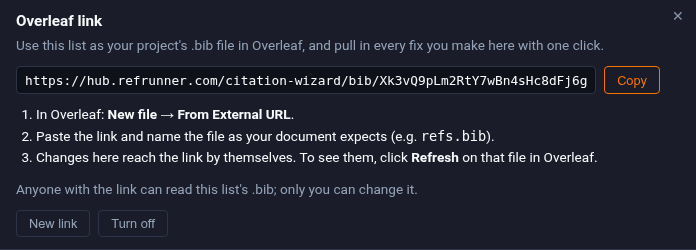
File → Overleaf link…
Your saved list gets a link of its own. Copy it. Anyone with the link can read the .bib; only you can change the list.
In Overleaf
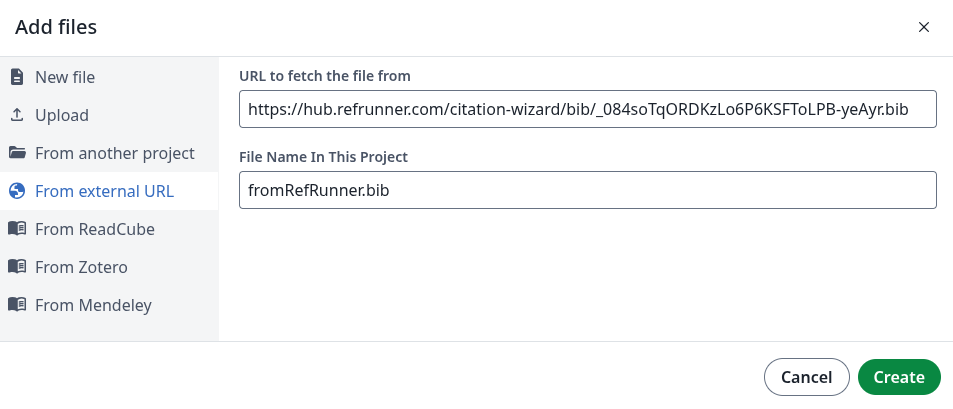
New file → From external URL
Paste the link and name the file. Overleaf fetches the .bib now and again each time you click Refresh on it.
Questions
Do I need Overleaf Premium?
No. Overleaf's Zotero and Mendeley integrations are Premium features, but adding a file From External URL, and refreshing it, works on the free plan. RefRunner's link is that URL.
Does Overleaf update by itself?
No — Overleaf re-reads a linked file only when you click Refresh on it. Everything you change in RefRunner reaches the link by itself; click Refresh and recompile to see it.
Will my \cite keys break?
No. A key is fixed the first time the list is published, so correcting an author or a year later never renames it. Entries from your own .bib keep the keys you gave them.
I already have a .bib. Will RefRunner rewrite it?
Only what the record corrects. Upload it, and each entry is checked against Crossref, OpenAlex and the other databases. Your fields, layout and cite keys stay as you wrote them; corrected or added fields are listed in a refrunner field (dated, and ignored by every style) so you can see what changed.
Can I edit an entry by hand?
Yes. Click ✎ Edit on a reference that came from your .bib and you edit the BibTeX itself. What you type is what goes to Overleaf.
Who can see the link?
Anyone who has the link can read the list's .bib; only you can change it. Make a new link and the old one stops working; turn it off and it's gone.
What does it cost?
A free RefRunner account has one saved list with its own Overleaf link, and 50 reference lookups a day. Subscribers get more lists — one per paper — and more lookups.
Does it work with natbib, biblatex and apacite?
Yes — it's an ordinary .bib file. Names in Chinese, Japanese or Korean are written as UTF-8, which biber and XeLaTeX read.
No account needed to try it — check our sample or upload your own paper, free and right in your browser.
A free account adds 50 lookups a day, saved reference lists, and free months when you refer colleagues.
📱 On a phone? Create a free account now and your reference lists will be waiting when start working on your paper.